

Blog

We have just released two updates to the Booking system in At The Yard. The first, exclusive bookings which brings the ability for you and your users to exclusively book a facility for a horse. The second, multi slot bookings to make it quicker and easier for users to book extended sessions in a facility.
To make the most of the facilities you provide many yards allow multiple horses to use a facility at the same time. At The Yard’s social features means your customers cam see what others are doing with their horse, letting them decide if it’s a suitable time to join in or if the need to wait for another slot.
However there are times when a horse must have the facility to itself, an exclusive booking. The most common example of this being a riding lesson with an external instructor which typically requires the entire school so not to interrupt the lesson.
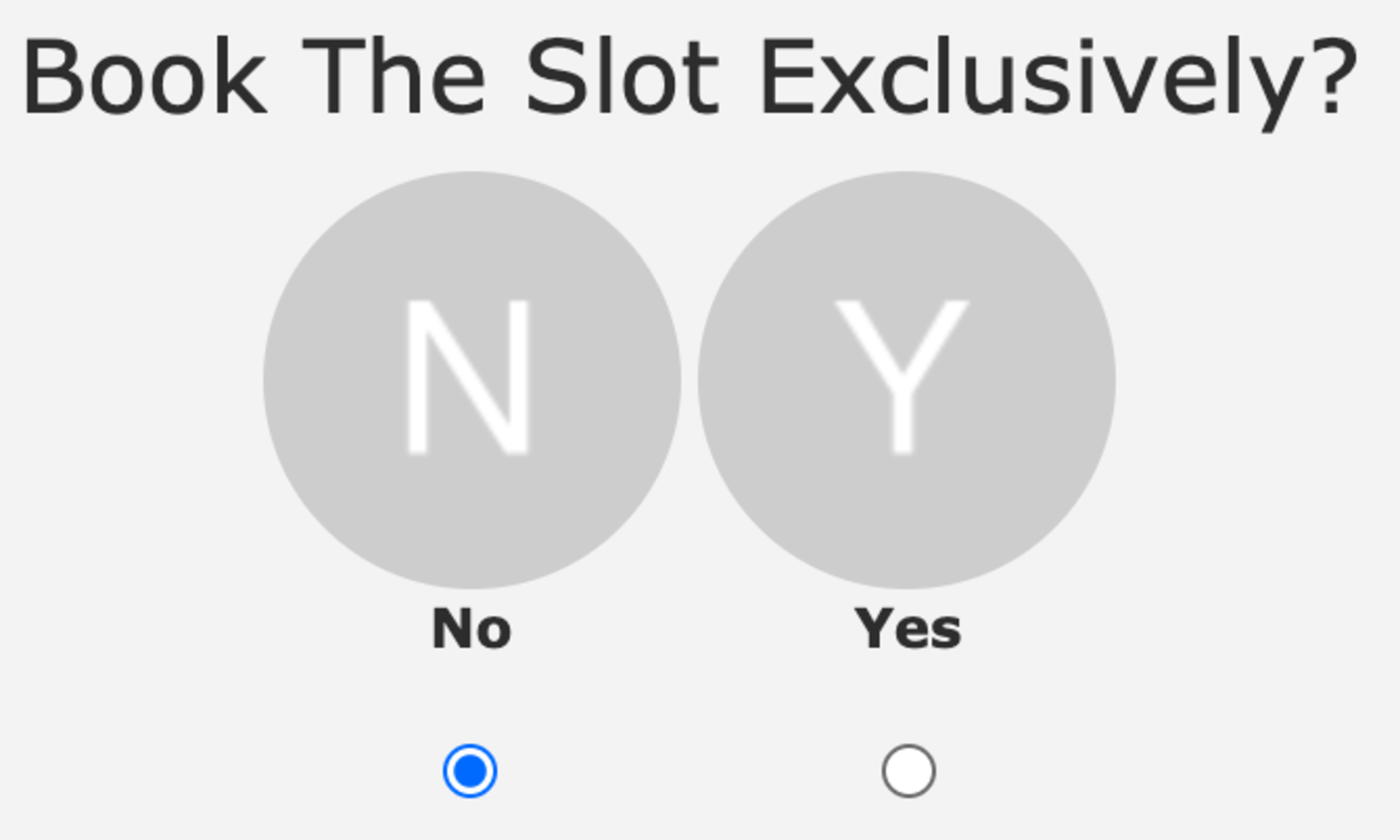
There are two different ways to set up exclusive bookings. The first is to simply allow users to choose when they want to make one. This can be done by going to the facility in the admin panel and checking the ‘Allow users to book exclusively’ checkbox.
Once setup the users will see a new option (shown above/to the side) when booking that will allow them to make it an exclusive booking.
The second way of setting up exclusive bookings allows you as a yard owner/manager a bit more control. It works by integrating with the defined uses for a facility. A new option called Exclusive Booking? is now present when making/editing a defined use. By checking this option it will make any booking for that specific defined use automatically an exclusive booking, all without any extra user interaction.
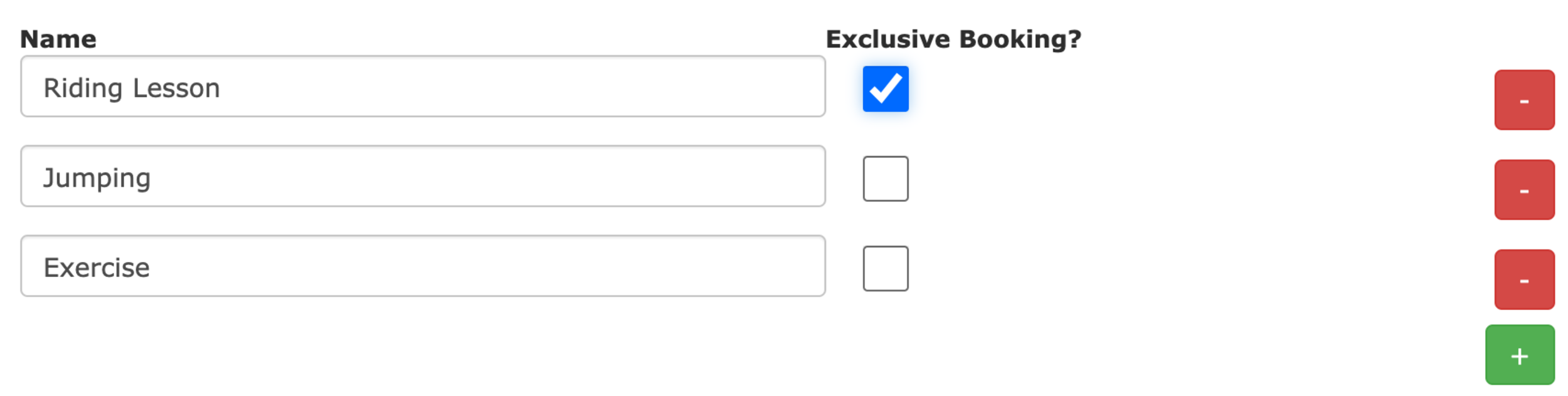
This allows you to offer the facility exclusively when required whilst stopping users from just choosing to have exclusive use of a facility either excessively or unnecessarily.
The second new feature called Multi Slot Bookings allows for bookings to be easily made which span multiple booking slots. The maximum length of these bookings is defined by the Maximum allowed bookings in a row value set for the facility in the admin panel.
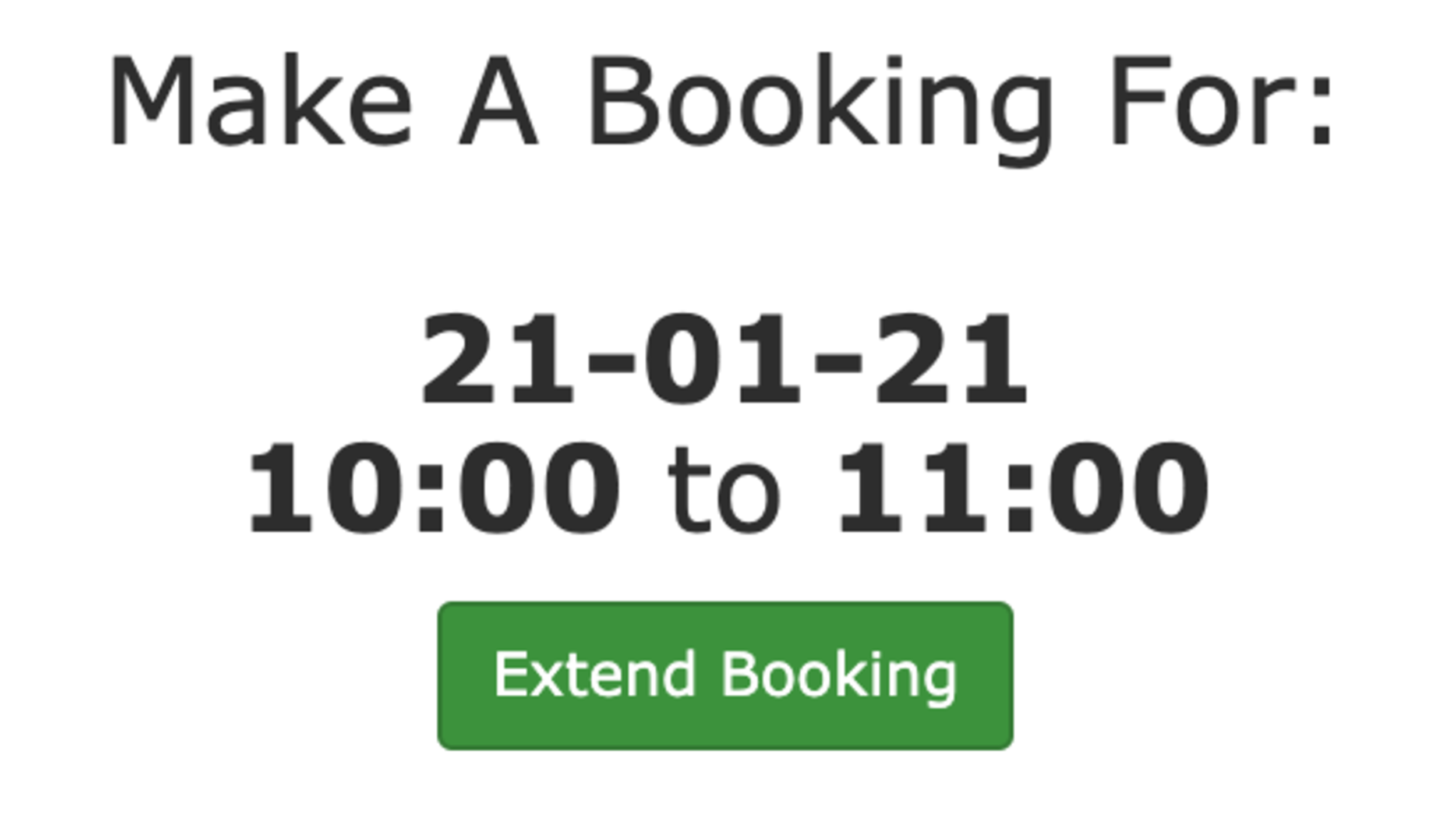
When a multi slot booking is available to a user they’ll see an Extend Booking button whilst making a booking, When clicked it extends the length of the booking by one slot length. It automatically checks the availability before offering the extension and if it’s possible it’ll allow to user to extend the booking more than once (up to the allowed number of bookings in a row).
This is also available for members of staff when making bookings on behalf of the users and will be coming to the kiosk view soon.
Over the years we have built into At The Yard a broad range of ways to help with the running of a livery yard. From service and bookings through to the feed system you can easily keep track of everything that’s taking place on the yard as well as what needs to be done for each individual horse.
However in the running of the yard there is always the need for that one-off task or the less structured set of notes that need to be shared amongst the staff. Things like sweeping the yard, asking someone to do a stock take or to fix a fence are just as important to the smooth running of a yard.
With this in mind we’re introducing Work Notes. Work notes allow you to share with your staff notes about what needs to be done in a quick easy and, most importantly, a completely flexible manner.
Each note has a title, a date (both single or recurring) and staff assignment options. Then there is the work note itself, it offers complete flexibility, you can add:
We designed it knowing that everyone has a unique set of information they need to share and so we wanted to support as much as we could.
To add a work note you need to be a manager type user. Go to the ‘Manager’ menu bar and click ‘Work Notes’. Here you’ll see all your existing work notes and have the option to add a new one (shown below).
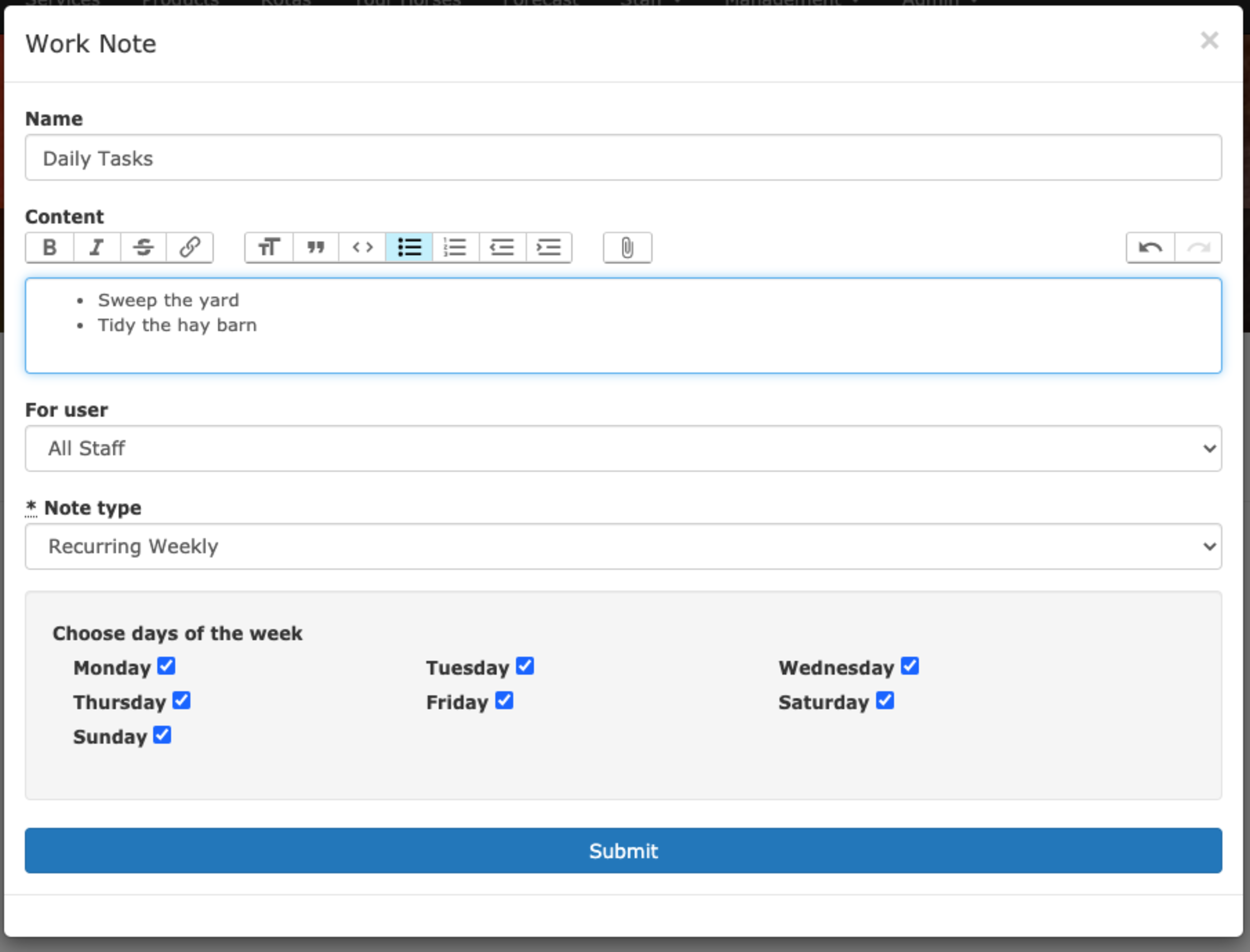
Work notes will show up in both the forecast view as well as on a staff members individual control panel (in both the calendar and today view). This means they quickly and easily see what’s required on a given day.
We’ve already seen yards using this new feature to great effect. As is usual with At The Yard it’s available for all new and existing subscribers straight away.
The control panel is at the heart of At The Yard. It’s the first thing everyone sees no matter whether they’re a user, staff member or an admin. It brings together information from across the system. Showing you everything from your latest charges and invoices through to an overview of what’s happening across the yard.
As At The Yard has grown over the years we have introduced more and more features and in step with this the control panel has grown to incorporate them. Everything from the all new activity log section through to expanding the calendar to show events, messages and public bookings, it’s all shown on that front page.
The information in these additions is as important as anything that came before them (otherwise we wouldn’t have included them 😉) but for every piece of information we add, the harder it is to find exactly what you need.
Because of this we decided it was time for a major refresh of the control panel with a new layout and a change in the philosophy that underpins it. And that new philosophy is a focus on today!
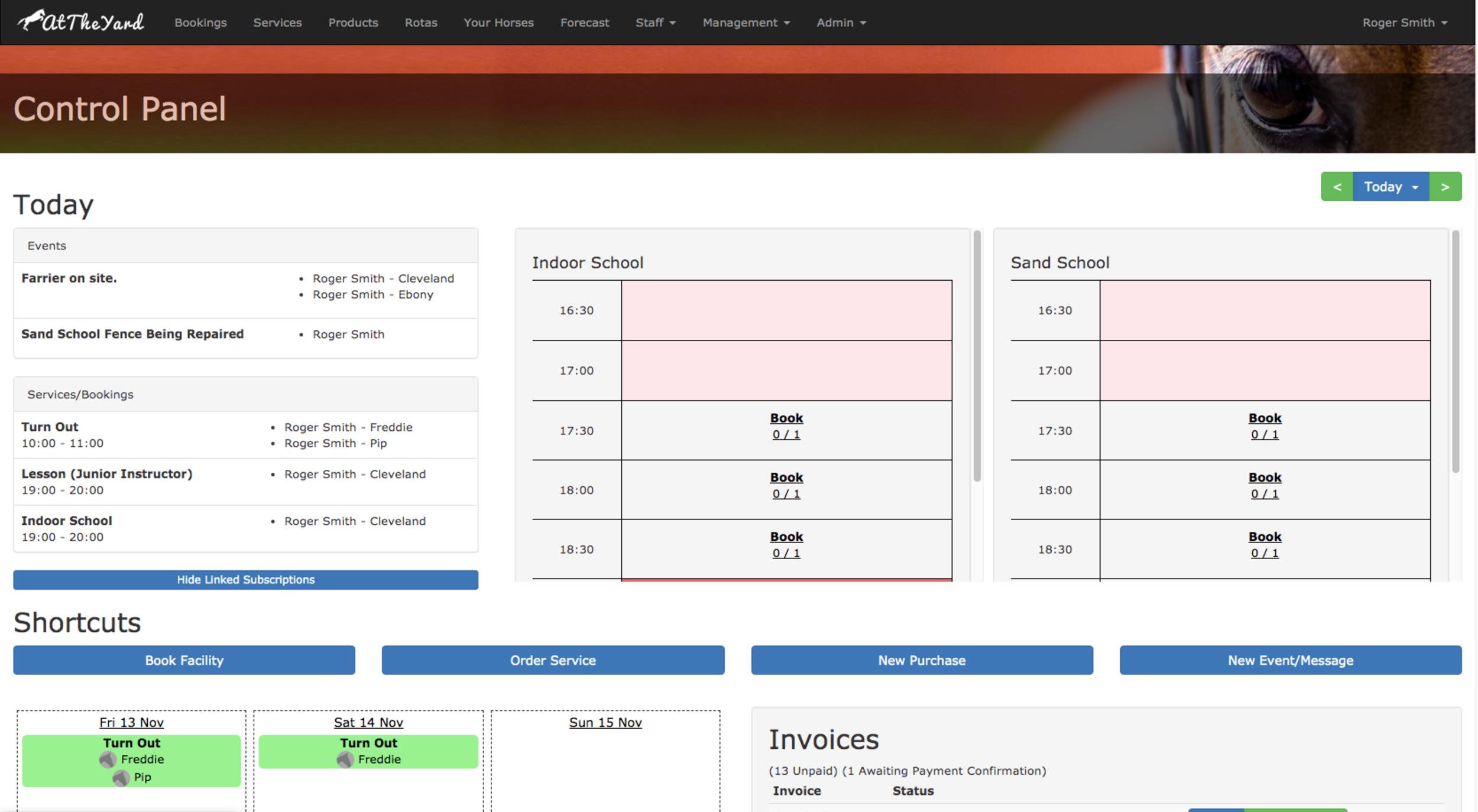
By focusing on Today we can display much more information directly than we could ever do in the calendar. This means information that used to be hidden away under a button click is now visible at a glance. Along side this we’ve introduced the today view for facilities. You can now choose a selection of your facilities (sand school, indoor arena etc) to be displayed on the control panel. This lets liveries see when the arena is available and book their slot directly from there. This makes it quicker and easier than ever for them to get riding whilst still keeping everyone on the yard informed.
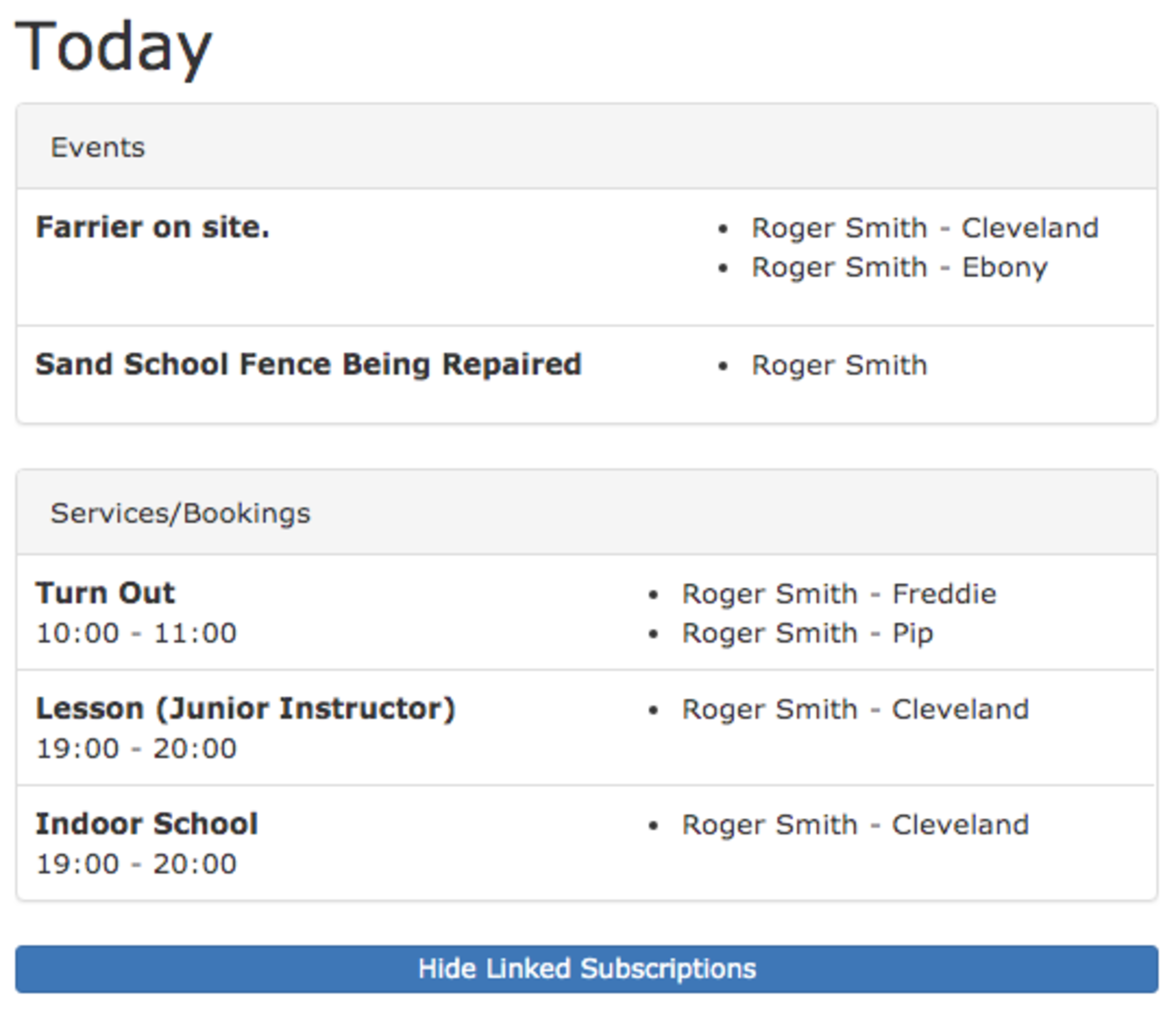
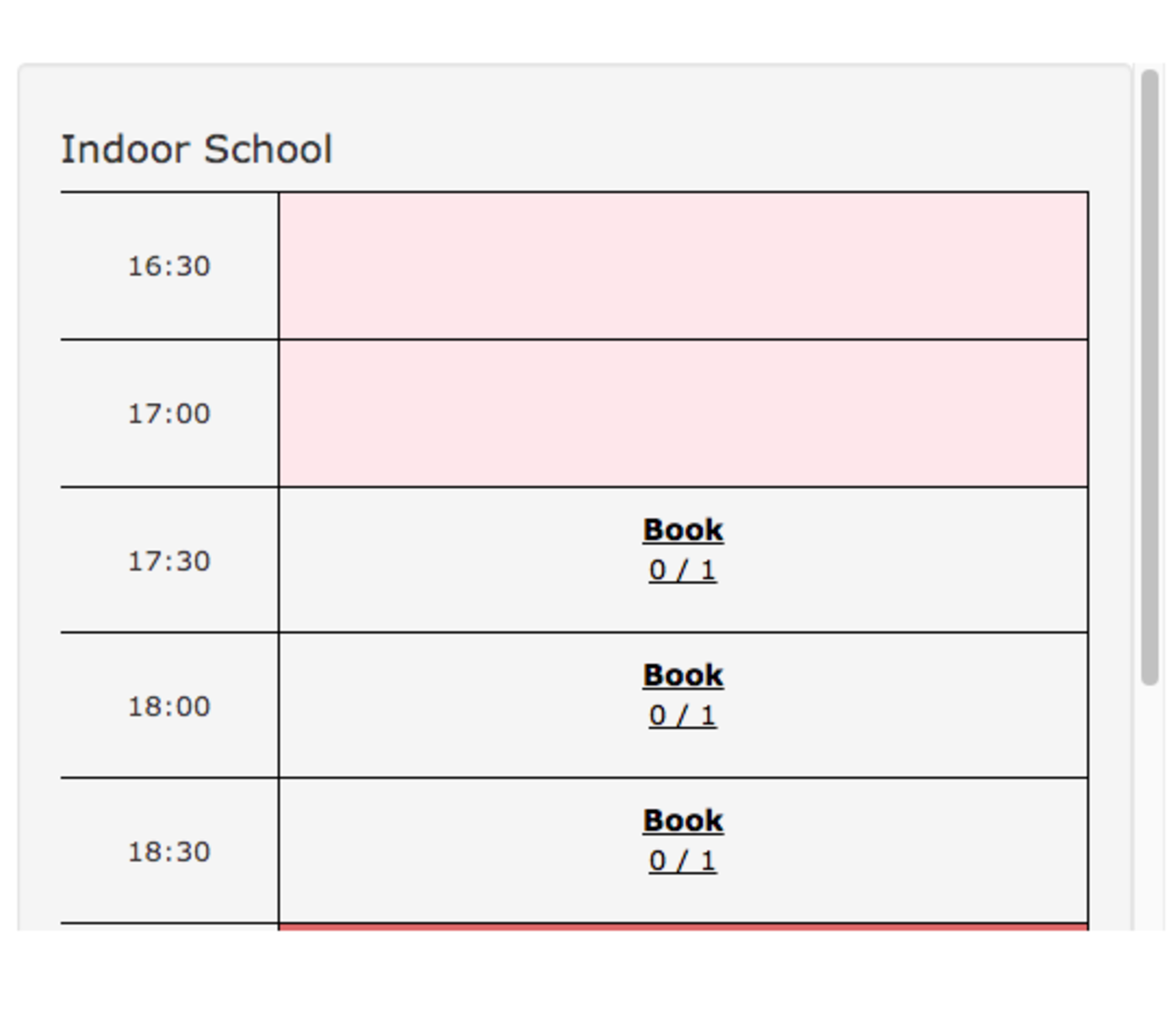
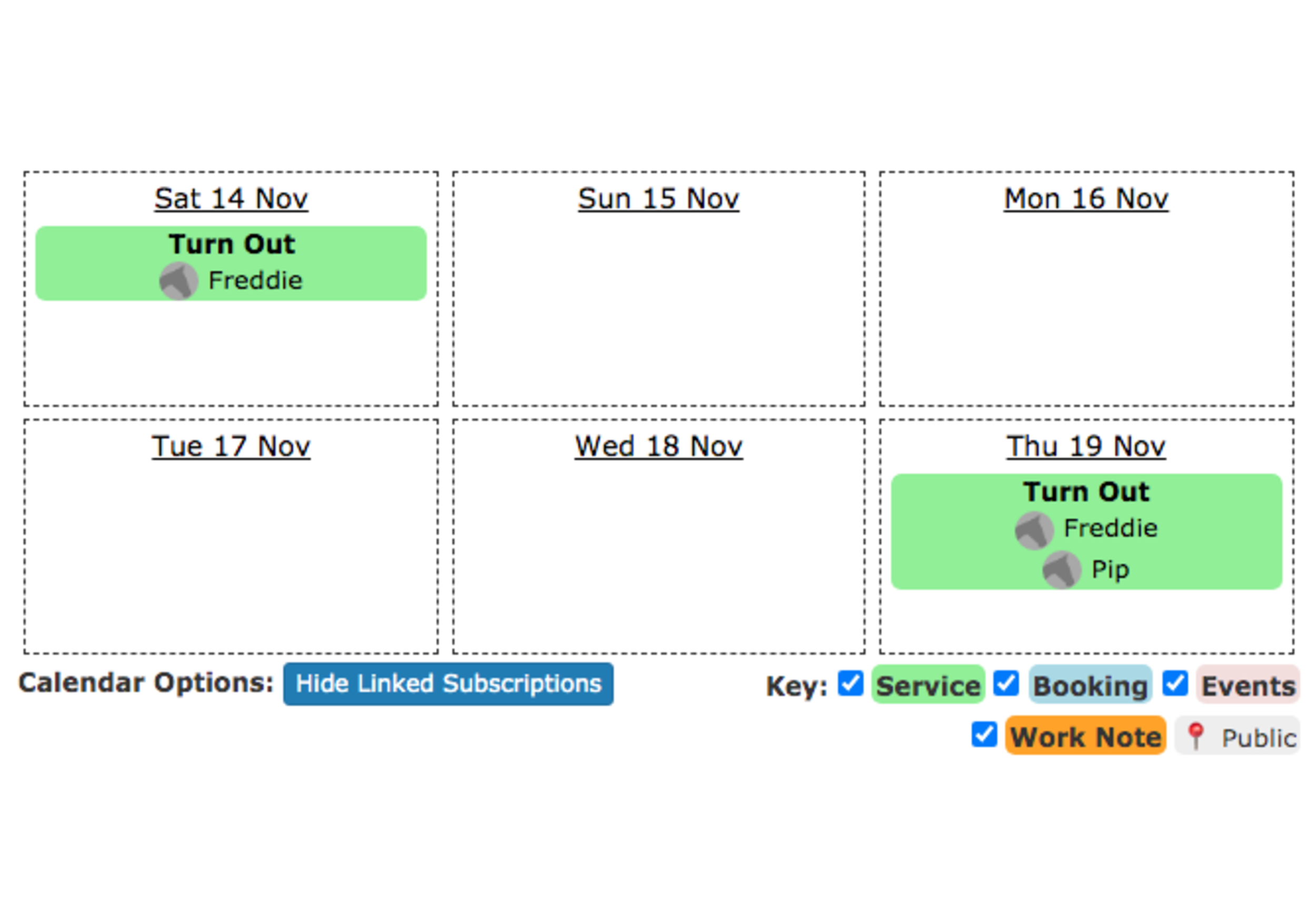
We’ve always described At The Yard as your digital yard diary. And in that spirit this is another step in simplifying and streamlining that experience.
For the keen eyed amongst you you’ll notice that the base for the new control panel was taken from the work we did on the kiosk view earlier in the year, which in itself received a highly positive response when we introduced it. From that base we incorporated the feedback and iterated on the design. From there we introduced it as a BETA feature (available via a button at the bottom of the old control panel) - this let us collect even more feedback as we made changes prior to this launch.
We did all of this as we know changing the front page of any service has to be done with care. So, by doing all these steps, we can be confident in this new philosophy and design being an improvement for all of our users.
We’re excited about this new Control Panel and the opportunities the redesign brings for future additions. As always, subscribers of At The Yard and their customers will automatically receive this update as part of the subscription. If you’re not yet a subscriber we’d love to hear from you - we offer free trials for all livery yards all you need to do is get in touch via our contact page. We’ll work with you to get everything up and running so you can start benefiting as soon as possible.
Last year we introduced Composite Bookings to At The Yard which allowed you to setup the links between your facilities and resources (e.g. an arena and an instructor). Since then we’ve introduced service ordering by calendar view which lets you have your services (like lessons) be bookable on a calendar.
These two updates brought with them a big leap in the usability of services in At The Yard. They did this whilst also making the ordering process much much quicker. Before the updates you or your customer needed to go and separately book the arena for the lesson to take place in and then book the lesson itself. This took longer and was prone to errors. With the changes it became a one step process - order the lesson and have At The Yard take care of everything else for you.
However it still had it’s limitations, what if you had more than one arena and you were happy for the lesson to take place in any of them? With the old system this wasn’t possible and you had to revert to the manual multi-step method - something we were not happy with and so we are excited to have launched this update which expands on our previous work, making this and so much more possible.
To facilitate this involved a complete rewrite of how we calculate availability and process bookings in At The Yard. In doing so we not only added this feature but put together robust system which can be built on in the future.
The key visible change to you and your customers is the ability to make those choices at the time of ordering/booking. Like everything in At The Yard it’s quick and simple, involving a single tap of a button. Once you’re done the system goes away and does all the hard work for you.
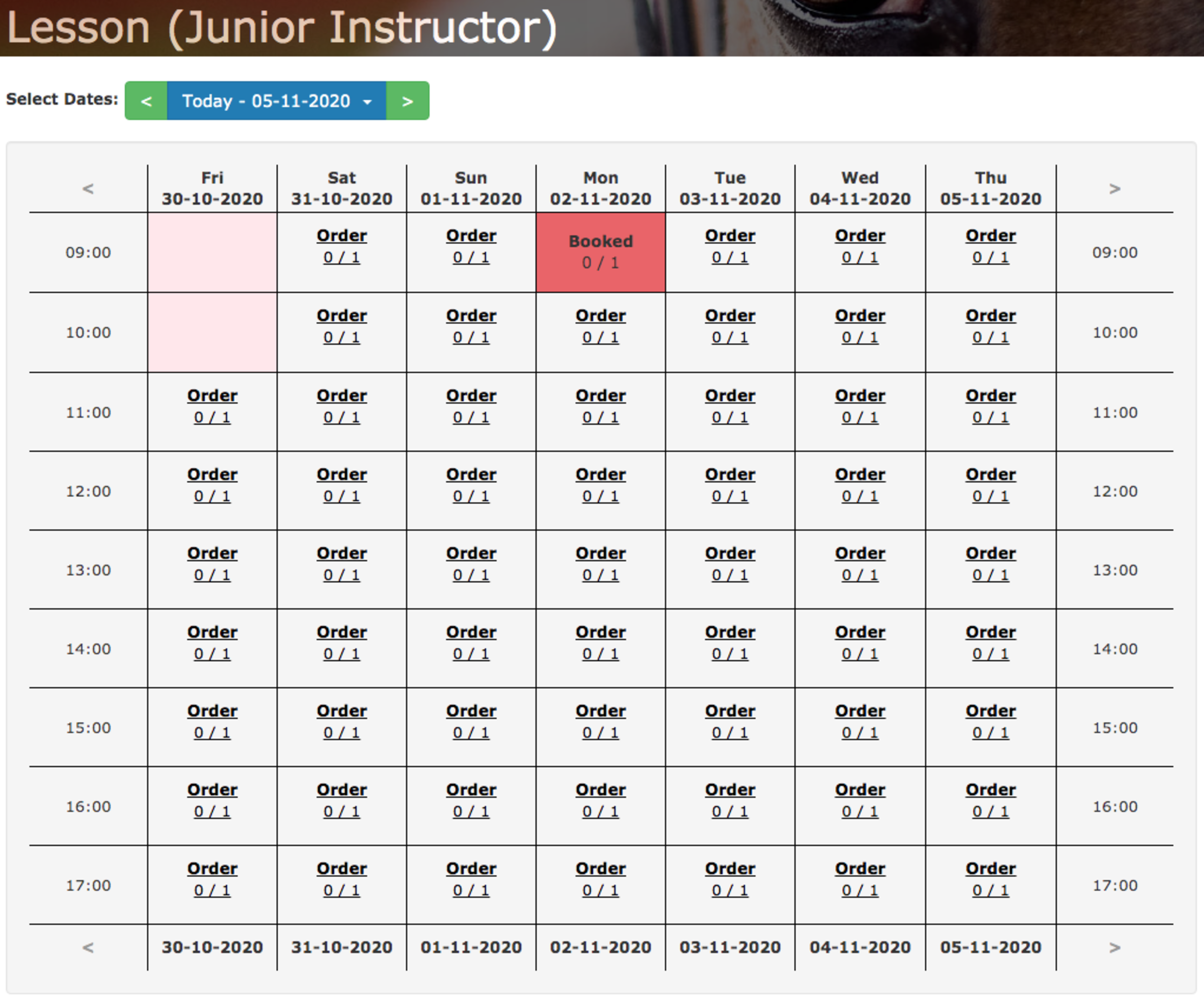
The changes to the booking/ordering screens that your customers see are relatively small. However one significant change is that on the calendar booking screen they now see a preview of availability that takes into account all of the linked services and facilities.
In the example shown below both the schools in which the lesson could take place have been booked during the first slot on Monday and so the slot show 0 / 1 bookings. This is because, whilst there is no lesson booked for that slot, it is still unavailable as none of the schools are available at that time.
When a customer chooses an available slot they’ll be met with the familiar order/booking screen. Now along with the choice of horse they’ll see a new option allowing them to choose which school they want to use (shown below):
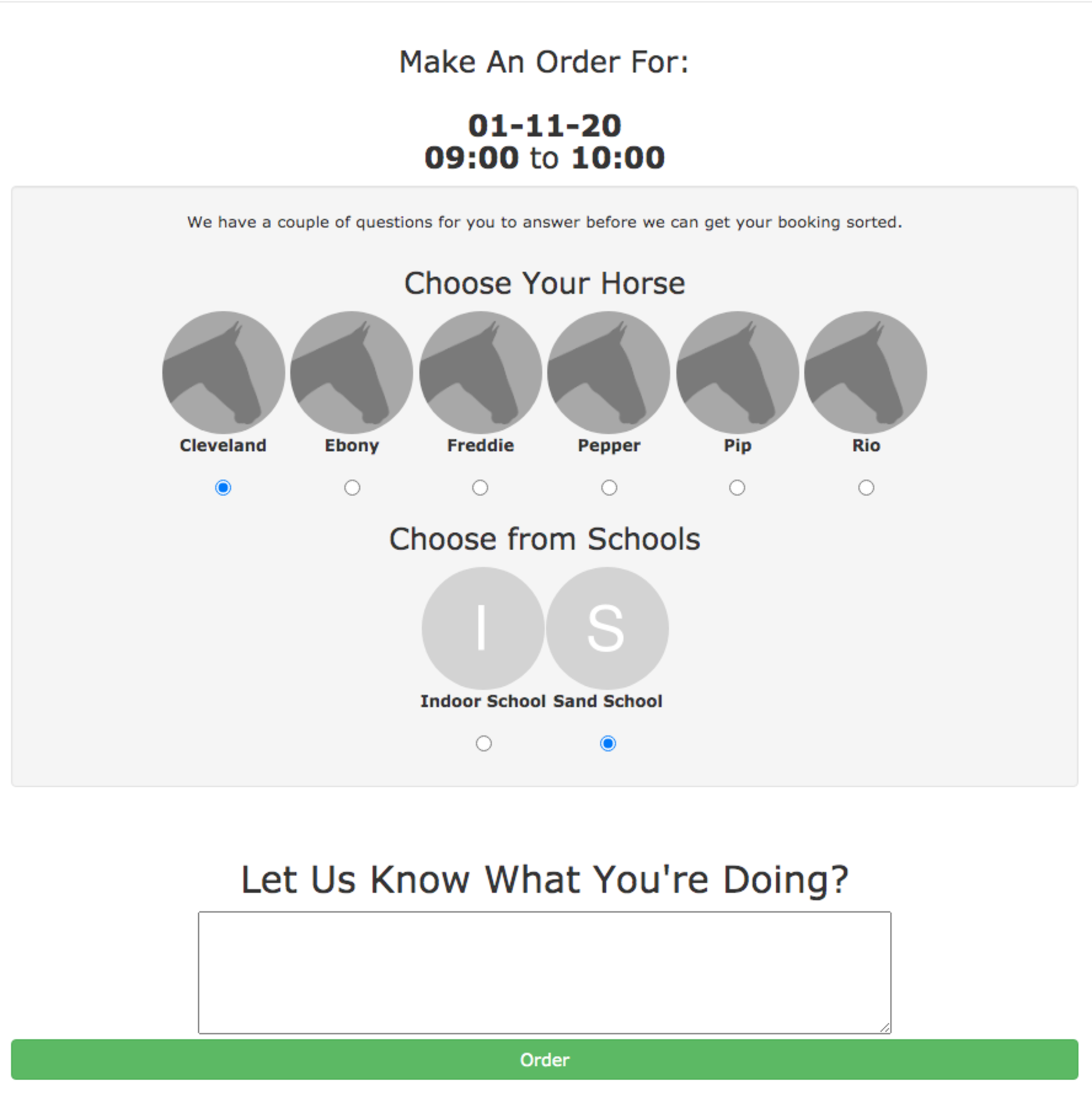
We’ve shown a very simple example here. But should you have multiple layers of dependencies (e.g. a choice between indoors or outdoors and then a further choice from multiple indoor and outdoor schools) the user will be presented with the needed questions one by one as they give their answers.
In this way you can have complex multilayer dependencies for your services (which can be as simple or complicated as you wish) and your users still only have to answer a few simple questions.
Like the previous system when they complete their order/booking it’ll automatically book the required facilities as well. The difference in the new system is that it’ll book the facilities in accordance to the choices they’ve made.
Getting everything setup is quick and easy. In this example we’re going to setup a service for a ‘Lesson with Junior Instructor’. The first step is to create a facility group that contains the facilities that could be used to teach the lesson in. You can find this option by going to Facility and click on the Show Dependency Groups button. This will show you all your existing groups and allow you to create a new one (shown below).
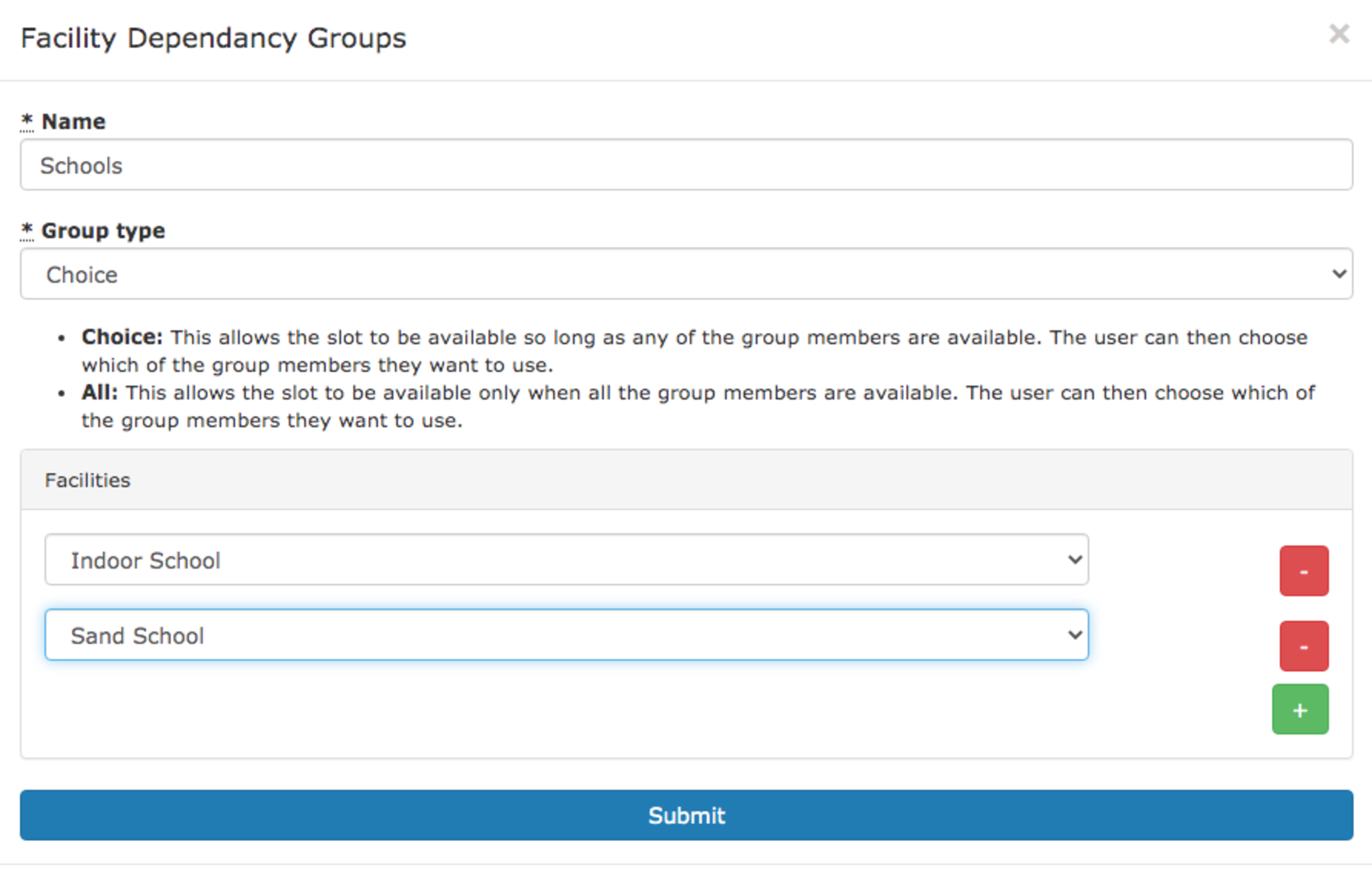
Within this form you can create a group and populate it with facilities. At this stage you also get to select the ‘group type’. At the time of writing there are two types; Choice and All. The type defines how the group is used when working out availability.
The next step is to add the new group as a dependency of the service. To do this go to Admin -> Service and edit (or create a new) service. Scrolling down you’ll find the Dependant Facility box.

Click on the plus to add the dependancy, then in the dropdown choose our newly created group (in this example Group: Schools). Then simply save the service.
You have now successfully setup the service and it’s dependencies and so it’s ready for your customers to use.
This new system offers complete flexibility in how you setup your yard and it’s dependencies, all whilst keeping things simple for your users. We’ve already had customers start using the new feature to great effect simplifying and optimising their day to day admin.
So if you’re using At The Yard and are not currently taking advantage of the new flexibility what are you waiting for! Alternatively if you’re not yet one of our customers and the idea of being able to have all the flexibility this offers whilst not creating any additional admin work please do get in touch today. We’d love to give you a demo and show you how you can save time and money.
If recent events have taught us anything, its that being able to quickly and easily distribute information to your customers is highly important. To help with this we’ve developed our latest new feature, called simply Notices.
Simple but effective, we’ve built Notices to cover a wide range of scenarios at your yard. These include:
For each notice you publish you’ll be able to decide who will see the notice, optionally include a checkbox to get their response and even mandate that they have to agree before proceeding (great for T&Cs updates).
Then, as a yard owner, you’ll receive insights for each notice you publish. Meaning it’s quick and easy to keep track of who’s yet to get the latest update about the yard.
By design we’ve made Notices incredibly simple for your customers. Whenever they visit the control panel, if a new notice has been published, they will automatically see a simple popup (shown below).
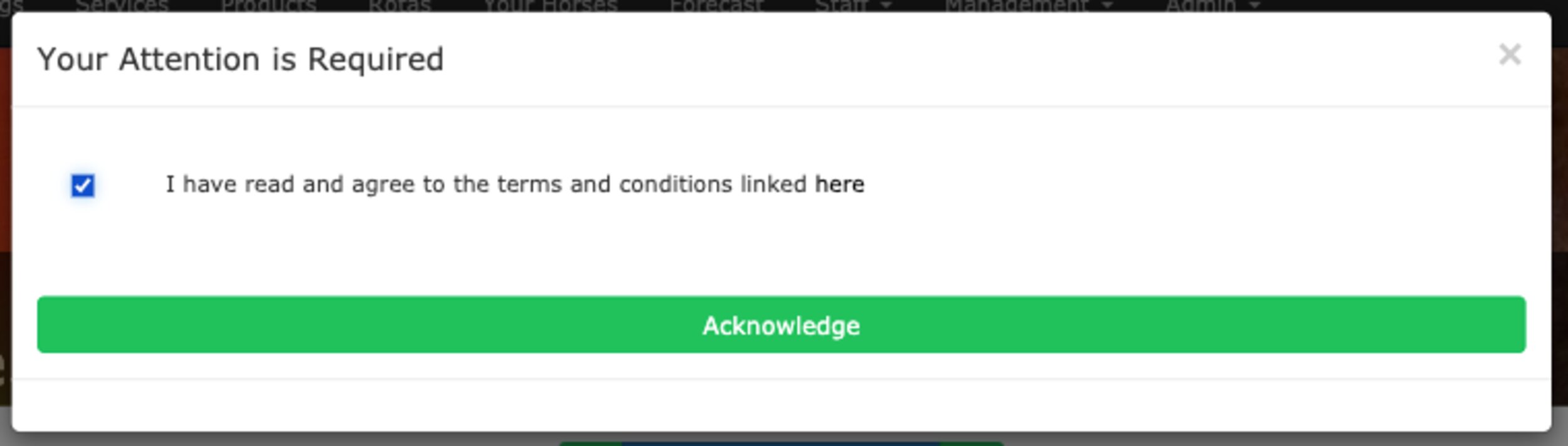
In this popup they’ll see all the latest notices that they’ve yet to acknowledge. Each notice will be displayed on it’s own row and depending on the choices you’ve made they may also see a checkbox allowing them to choose their response.
When they’re ready they just click on Acknowledge. That’s all there is to it.
Actually creating the notices is nearly as easy as it is for the users to read and acknowledge them. To start, go to the Notices menu item under the Admin menu section.
You’ll see an outline of the notices you’ve created and the option to create a new one. The new notice form is shown below to the right.
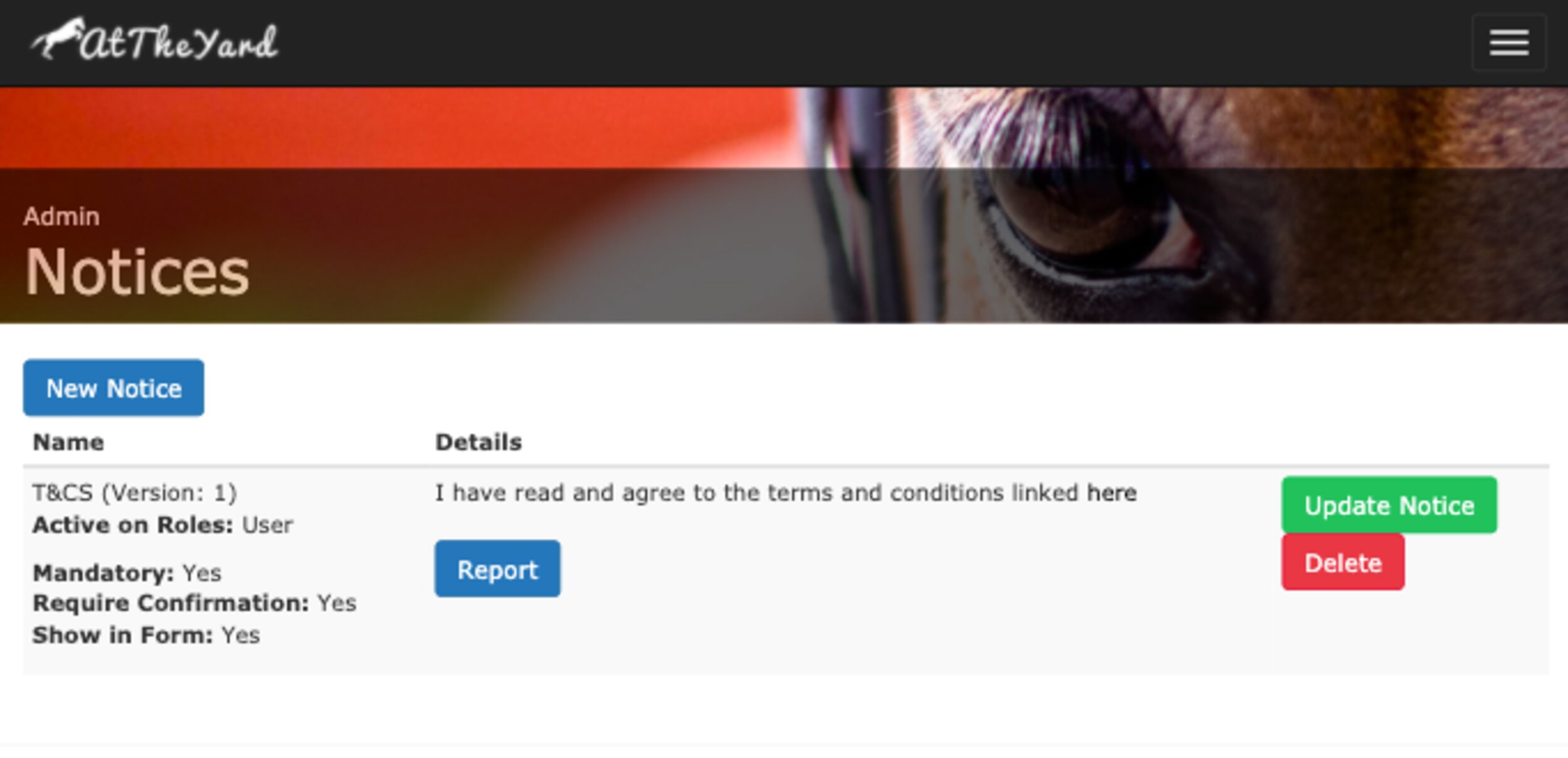
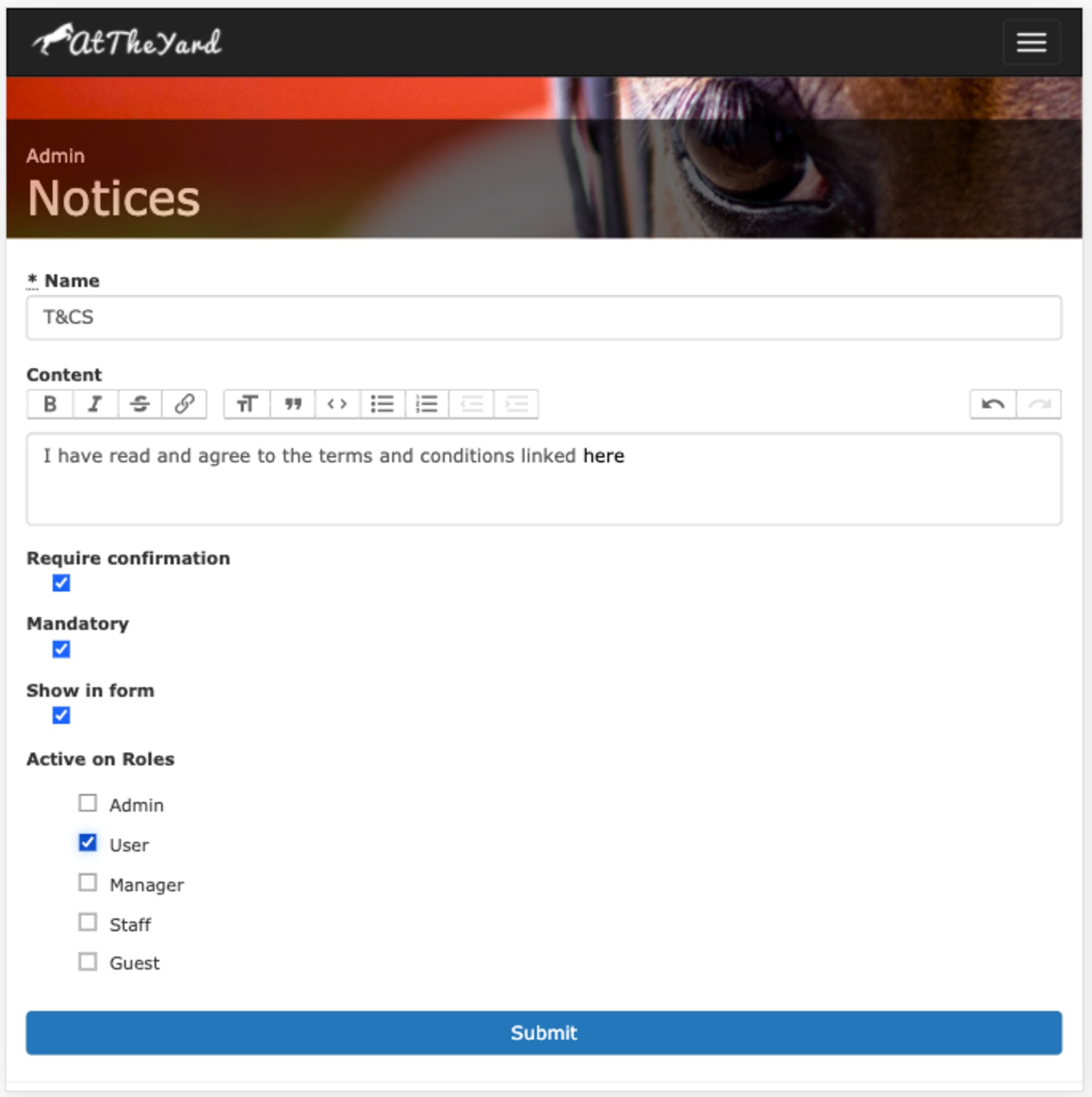
You’ll be able to name the notice and fill in the content that makes up the notice itself. Once you’ve filled that in there are a few other options for you to choose from.
Reports are the end product of the notice system. They allow you to see an overview of how your customers have responded.
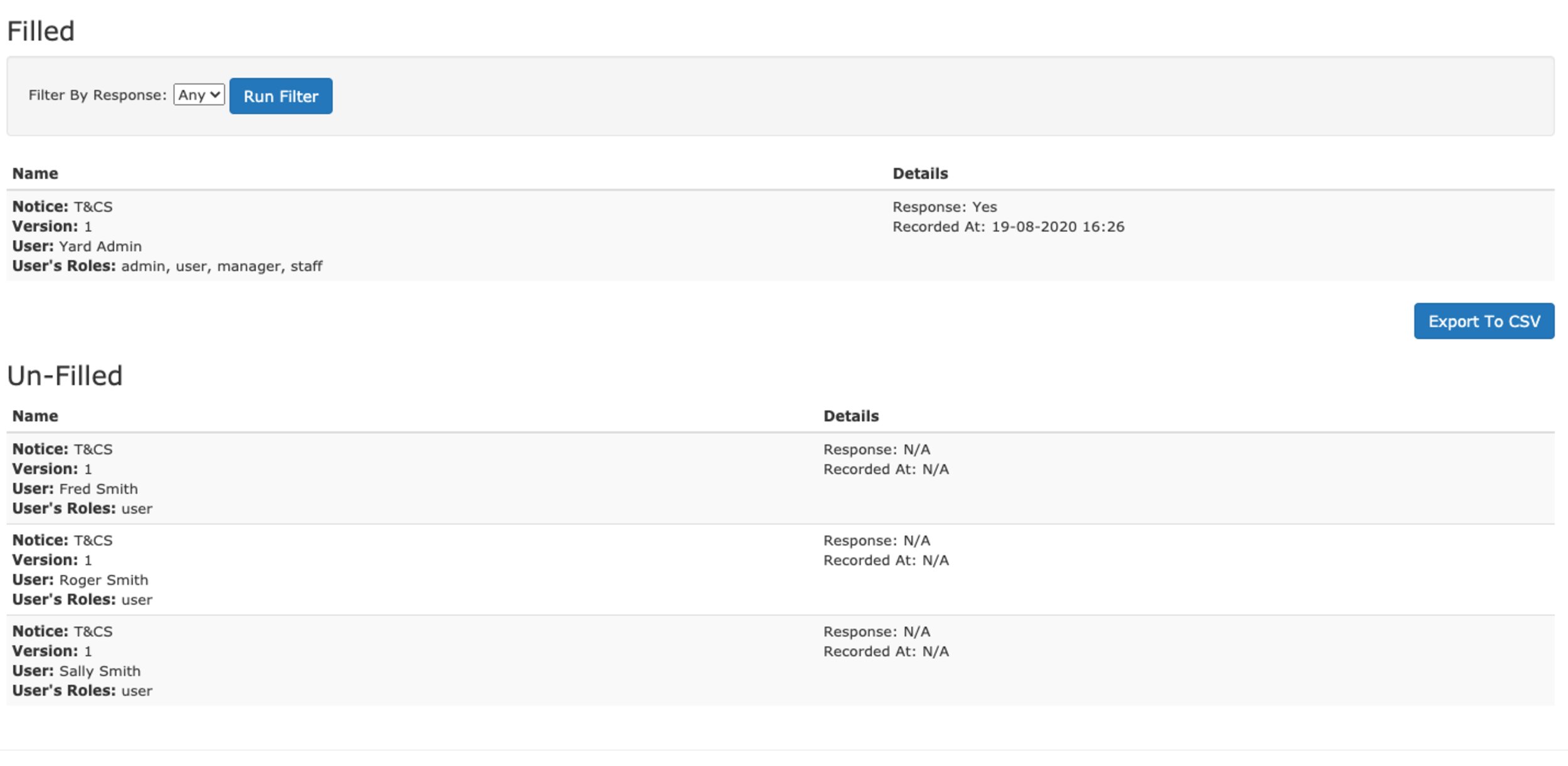
The report is broken down into two parts. Part 1 shows the users who have acknowledged (filled in) the notice and part 2 shows those who haven’t.
Within the Filled section you’ll see all the users who’ve filled it in along with other details such as their response and the time at which they responded. You can also filter by the value of the response.
On their own the reports allow you to keep track on the responses from your customers. However to extend their utility we’ve built an Export to CSV feature. With this the possibilities are endless, from doing your own analysis in other software (such as a spreadsheeting tool) through to exporting data to a 3rd party system (e.g marketing platforms) you can use the data however you need and take it to wherever it’s needed.
Notices is an example of a feature that we’ve built in part to support yards should the worst happen and some version of ‘lock down’ returns. We’ve got more ideas in the pipeline which we believe will help, but we’re also open to recommendations. If you have any suggestions please feel free to get in touch with us via our contact page. We’re open to considering any ideas you may have to help yards in these difficult times.